
How to Make a Shape Maze: Hearts, Stars and Animals
Make a heart or animal maze with built-in shapes, then play, print, or export it. Learn how masks work and why uploaded images are not supported.
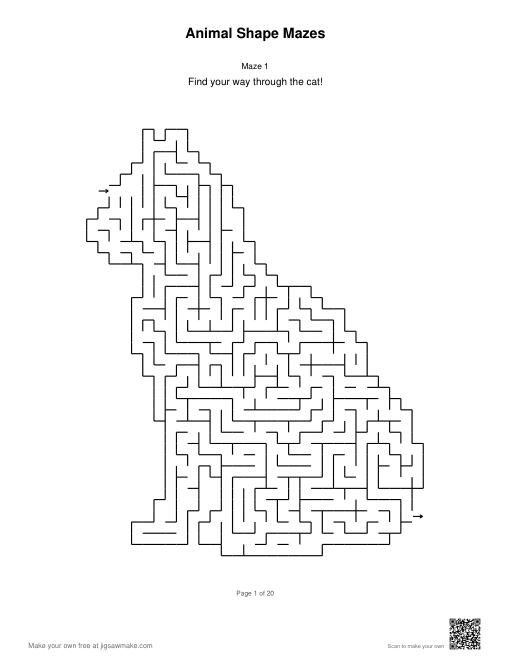
To make a heart or animal outline, open the maze generator and choose Shape. This guide explains what the outline changes and how to check your result. For fixed collections with answer pages, browse mazes for kids.
What a Shaped Maze Actually Changes
A shaped maze puts familiar horizontal and vertical corridors inside an outline. Imagine placing a silhouette over a square grid: cells inside the silhouette can become part of the maze, while cells outside it are excluded. This outline is called a mask. The generator connects passages through the included cells and leaves the surrounding space empty, so a heart or animal remains recognizable when the walls are drawn.
The shape does not change every cell into a different polygon. A circle option here is a round outer silhouette built from square-grid cells, not a set of concentric rings. A star still has right-angle passages, and an animal's ears are made from the same kind of grid as its body. This distinction matters when choosing a tool: the built-in options do not provide hexagonal, triangular, or circular-ring grids.
Choose from Fourteen Built-In Options
Shape offers a rectangle, circle, heart, star, and ten animals: cat, dog, bunny, fish, turtle, elephant, owl, butterfly, dinosaur, and whale. The rectangle keeps the full grid. Geometric and animal options exclude cells outside their outlines. You can use the same options on the main maze page and the children's page; the surrounding page changes the starting settings, not the list of available silhouettes.
Uploading your own image to create an outline is not supported. There is no photograph tracing, background removal, or custom logo import in this maze tool. If you need an animal activity immediately, choose one of the built-in silhouettes or download the ready-made animal pack. The separate illustrated children's packs place character pictures beside rectangular mazes; those pictures are not uploaded masks and do not alter the corridor outline.
Make a Heart Maze Step by Step
Open the generator and find Shape in the configuration area. Select Heart, then inspect the grid dimensions. If either dimension is below 15, choosing a circle, heart, or star changes the grid to 20×20 and displays a notice. Animals use a different rule: if either dimension is below 30, selecting an animal changes the grid to 30×30. Start with that size for a first preview. Choose a difficulty level and select Generate for a new route. The heart boundary will appear as small steps because it follows the square-grid cells.
Look at the entrance, exit, and passage width before downloading. Turn on the answer preview if you want to check the route, then hide it before sharing a puzzle screenshot. A more detailed outline is not always a better worksheet: adding cells makes the edges smoother but narrows the passages at the same print size. If a child will trace the maze with a thick pencil, inspect the printout rather than judging only the screen preview.
Switch to an Animal and Inspect the Narrow Parts
Choose Cat for a seated outline, or try an animal with a broader body such as Turtle or Whale. The animal artwork is fitted into the grid without stretching its proportions. This can leave unused space around the silhouette, especially when the grid is not square. Those blank regions are outside the maze. The generator keeps a connected set of included cells so that the puzzle can be navigated through its passages.
Small details need enough cells to survive. A narrow tail or ear can look different at 30×30 and 50×50, even when the source silhouette is the same. Compare the actual outline before selecting a size for printing. The entrance and exit are placed on valid maze cells near their requested positions. In a shaped outline they may sit inward from the corners of the overall rectangle, which is expected rather than a missing start point.
Adjust Difficulty Separately from the Outline
The tool offers Kids, Easy, Medium, Hard, and Impossible difficulty levels, along with Recursive Backtracker, Prim, and Kruskal algorithms. These settings change how passages are generated; Shape changes which cells are available. For a useful comparison, keep the shape and dimensions fixed while trying another difficulty. If you also change the outline and grid size, it becomes harder to tell which change produced the result you prefer.
Treat difficulty labels as a starting point, then inspect the puzzle. A silhouette's narrow sections can limit the number of choices available there, even on a harder setting. A broad section may contain more junctions. No outline promises a specific solving time or suitability for every age. For children's activities, choose a comfortable printed passage width first and let the child try one page before preparing a whole collection.
Preview, Play, and Export the Same Shape
The preview, online game, and PDF, PNG, and SVG exports use the selected maze's shape. In online play, movement follows the valid passages and cannot enter blank cells outside the outline. Try the puzzle yourself to see whether the start and finish are easy to locate. The answer preview shows the route through that same puzzle; it does not create a second maze with different walls.
Choose PDF when you want a printable document. The generator provides separate puzzle and answer-key PDF downloads, allowing you to keep the solution away from the student copy. PNG is useful when you need a single raster image, while SVG keeps the drawing in a vector format. A larger display preview is not proof that a printed corridor will be wide enough, so open the actual exported file and check its page or image size.
Make a Batch or Open a Prefilled Link
Batch mode can generate multiple mazes using the chosen shape. Set the number of puzzles and the layout before creating the batch, then download the puzzle or answer-key PDF. The generator supports one, two, or four mazes per page. An animal that is comfortable on a full page may become fiddly at four per page, so use a small trial batch to check the smallest details before printing many copies.
A prefilled maze link can carry a shape setting. When you open one, the generator reads that outline along with the other supported options. Older maze links without a shape setting use Rectangle. Keep the exported file when you need a fixed print copy, and check any prefilled link before relying on it for a class. Keep the worksheet file if you want to distribute a fixed page that everyone can print without reopening the tool.
Use Ready-Made Shapes When You Do Not Need Custom Settings
The children's page offers an animal pack with one 40×40 Easy maze for each of the ten animals. Its geometric pack has four hearts, four stars, and four circles; each shape appears at 20×20, 25×25, 30×30, and 30×30. Each puzzle occupies one US Letter page. The answer section follows the puzzle section, with matching numbers and red solution lines. These are fixed collections, so repeated downloads contain the same puzzles.
Use a ready-made pack when you want a predictable set with answers already attached. Use the generator when you want a different size, difficulty, algorithm, title, or number of puzzles. In either case, the outline can provide a theme for an activity without changing the basic task of finding a connected route. Let children choose a familiar animal, compare two outlines, or explain where they changed direction; no additional scoring system is necessary.
Frequently Asked Questions
Can I upload a photograph or logo to make a shape maze?
No. The maze generator supports built-in outlines only. It does not trace uploaded photographs, logos, or drawings. Choose a rectangle, circle, heart, star, or one of ten animals. If you want illustrated characters beside a maze rather than a shaped outline, use the ready-made children’s packs.
Does Circle create a maze with concentric rings?
No. Circle changes the outer boundary while keeping the underlying square-grid corridors. You will still see horizontal and vertical passages and a stepped edge. The tool does not provide concentric-ring, hexagonal, or triangular grids. Check this distinction before choosing it for a design that specifically requires curved passages.
Why did my small grid change when I chose a shape?
An animal outline needs more cells for its details: if either dimension is below 30, choosing an animal changes both dimensions to 30×30. For a circle, heart, or star, a dimension below 15 changes both dimensions to 20×20. Each adjustment shows a notice. Inspect the new preview, then adjust the grid if you want another size. Rectangle can keep the smaller starting grid.
Will my PDF keep the animal shape?
Yes. The puzzle preview, online game, PDF, PNG, and SVG exports use the maze’s selected shape. Batch generation also accepts that shape. Check the actual downloaded file before printing a full set, especially if you put several mazes on one page and the passages become smaller.
Where can I get fixed shape-maze collections with answers?
The children’s page has an animal pack with ten 40×40 puzzles and a geometric pack with twelve heart, star, and circle puzzles. Both use US Letter paper with one puzzle per page. Numbered answer pages follow the puzzle pages and show the route with a red line.