FreeArithmetic → math mazes

Free Math Maze Generator

Create math mazes for multiplication, addition, subtraction and division. Choose true equations, a target answer or multiples, then follow the correct cells from START to FINISH. This math maze generator makes printable worksheets with matching answer keys, plus PNG and SVG downloads for your own lesson materials.

Create a Math Maze

Part of our free Maze Generator toolkit, which also creates traditional wall mazes with adjustable grid dimensions and printable solutions.

Build Your Math Maze Worksheet

Preparing your math maze…

Move up, down, left or right from START to FINISH. Follow only cells that match the rule; do not move diagonally.

Ready-to-Print Math Maze PDF Packs

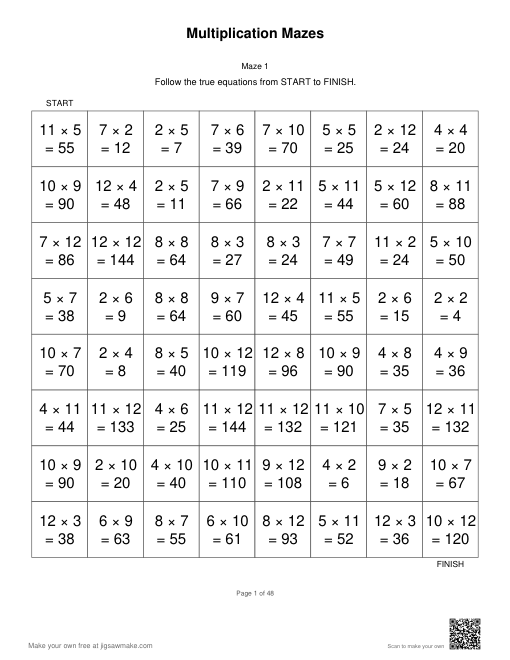
Choose a fixed collection of 24 true-equation worksheets on 8×8 grids. Each US Letter PDF has 24 puzzle pages followed by 24 numbered answer pages. Multiplication uses factors from 2 to 12; the addition and subtraction pack alternates operations with sums and differences within 20. Incorrect equations can show answers outside that range. Follow only the true equations; blue cells with bold text show the route on the answer pages.

First worksheet of Multiplication Mazes: an 8 by 8 grid of equations with a printed rule

Multiplication Mazes

24 puzzles · 48 pages including answers

24 multiplication mazes with 8×8 grids, 1 per page. Both factors range from 2 to 12. Follow true equations from START to FINISH; blue answer paths follow the puzzle pages.

Download PDF: Multiplication Mazes, with answers
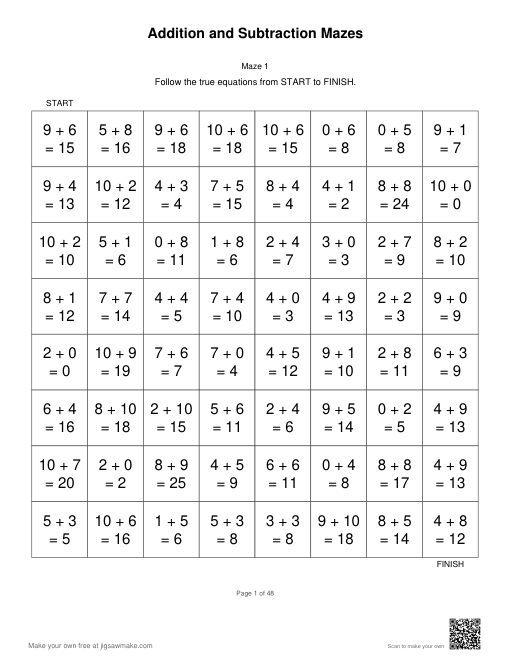
First worksheet of Addition and Subtraction Mazes: an 8 by 8 grid of equations with a printed rule

Addition and Subtraction Mazes

24 puzzles · 48 pages including answers

24 addition and subtraction mazes with 8×8 grids, 1 per page. Odd-numbered puzzles use addition and even-numbered puzzles use subtraction, with sums and differences within 20. Answers are included.

Download PDF: Addition and Subtraction Mazes, with answers

Free Math Mazes with a Clear Route

One arithmetic rule per worksheet

Each worksheet prints its rule above the grid. A true-equation maze asks students to test a statement, a target maze asks them to calculate a result, and a multiples maze asks them to recognize numbers. Choose the format that matches the practice you want to see, rather than changing every setting at once.

Matching answers for every puzzle

The answer page highlights route cells in blue and makes their text bold. PDF puzzle and answer numbers match, including in a batch. Keep the answer pages for checking work, or share one after students finish and ask them to explain a decision at a junction. PNG and SVG can also show the solution.

Adjust arithmetic and visual load

A larger grid adds more cells to inspect; a higher operand limit changes the arithmetic. These are separate choices. Begin with a smaller grid when introducing a new operation, then increase its size once students understand the rule. Letter and A4 PDFs place one puzzle on each page with room around the grid.

How to Make a Math Maze Worksheet

Choose a math maze format

Select True equations, Target answer or Multiples. For equations, choose addition, subtraction, multiplication, division or mixed operations. For a multiples maze, choose the number whose multiples students should follow.

Set the range and grid size

Choose an operand limit of 5, 10, 12 or 20 and a grid from 6×6 to 12×12. In Target answer mode, enter a result that can be made with your selected operation and range.

Generate and check the worksheet

Enter a title and click Generate for a fresh route. Use Show Answer to inspect the solution. Students move horizontally or vertically from START to FINISH, stepping only on cells that satisfy the printed rule.

Download your math maze

Open Export and choose Download PDF for US Letter or A4. Set 1–20 puzzle pages; matching answer pages follow at the end. Download PNG or Download SVG saves the current preview, including the answer if it is shown.

Multiplication Mazes Printable for Classroom Practice

Multiplication fact practice

Use multiplication with an operand limit of 5, 10 or 12 to practice a range of facts. The tool includes zero and does not isolate a single times table in this mode. For a single-number recognition activity, switch to Multiples and enter the number you want students to follow.

An addition maze warm-up

Start with Addition, True equations and a 6×6 grid. Ask learners to calculate each proposed next step before drawing their route. Operands can be as high as the selected limit, so a range of five can produce sums up to ten. Choose settings around facts your class has already encountered.

Subtraction without negative results

Select Subtraction when students are practicing whole-number differences. Every calculation has a nonnegative result, including the calculations shown in distractor cells. A false equation can still have a positive proposed answer, so students need to check the subtraction itself rather than relying on the sign of the number.

Division review on paper

Division mazes use exact division with a nonzero divisor. There are no fractional results or remainders to interpret. Review the preview before distributing it because the dividend may exceed the range label: that setting bounds the divisor and quotient. Keep the grid small if students need space for separate working.

Partner explanations

Give partners the same worksheet and ask them to take turns explaining a move. One learner calculates while the other checks that the next square shares an edge with the current square. Compare the route with the answer page afterwards. A correct route is a starting point for discussion, not a complete record of reasoning.

Independent practice packets

Set PDF puzzle pages to create several worksheets under the same settings. The first puzzle matches the current preview; later puzzles use new seeds. Keep the numbered answer section separate when printing a student packet. For different operations or ranges, generate separate batches so each worksheet has a clear and consistent focus.

Three Ways to Follow the Numbers

True equations

Step on equations such as 6 × 7 = 42 and avoid incorrect statements such as 6 × 7 = 41. The incorrect answers are near the true answer or differ by an operand, so checking the calculation matters. This is the default multiplication worksheet format.

Target answer

With a target of 12, follow expressions such as 3 × 4. There is no printed equals sign or answer. Other cells evaluate to a different nonnegative result within five of the target. If your operation and range cannot make the target, adjust them before downloading.

Multiples

Choose a number from 2 through 20. For a multiple of 3 maze, the route contains numbers such as 3, 6 and 9, up to 36. Other cells contain nonmultiples in the same interval. This mode displays numbers instead of equations and uses multipliers from 1 through 12.

Math Maze Questions and Answers

Make Your Next Arithmetic Maze

Choose one operation and a manageable grid, inspect the answer, and download your worksheet. Use a single puzzle for a short activity or prepare a batch with numbered answers for later lessons.

Open Math Maze Generator